WordPress block
Use the WordPress block when your booking page is built with the standard WordPress editor.
Add the block
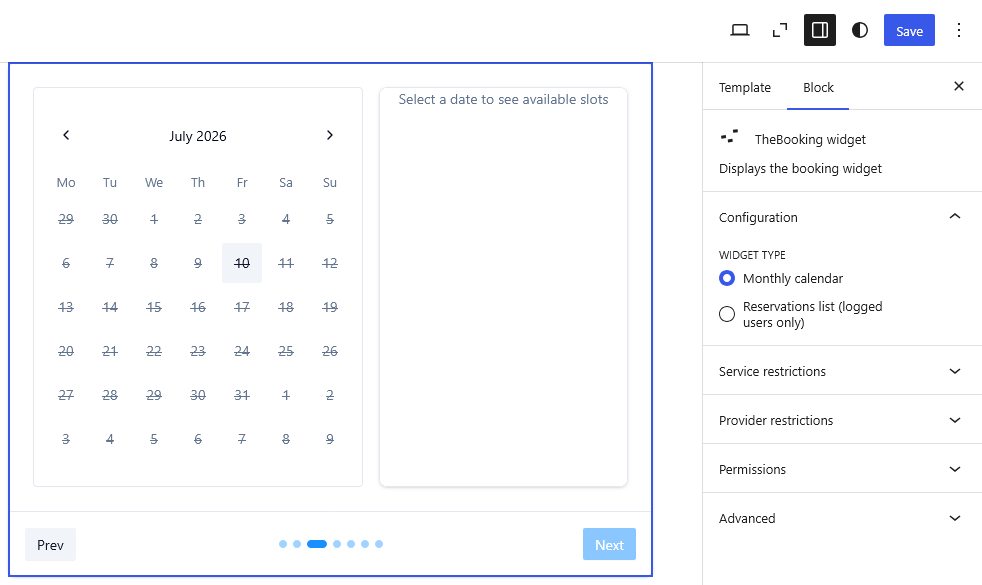
- Edit the page or post where customers should book.
- Add the TheBooking widget block.
- Choose the widget type:
- Monthly calendar for new bookings.
- Reservations list (logged users only) for the My bookings area, where customers review their bookings.
- Save or publish the page.
Booking flow
In the Configuration panel, Booking flow decides how customers start a booking from this widget:
- Use global setting (default) follows Settings > Core > Frontend > Booking flow.
- Service first starts from the list of services.
- Calendar first starts from a calendar of availability across services.
See Booking workflow for what customers see in each flow. The option does not apply to the reservations list.
Configure the monthly calendar
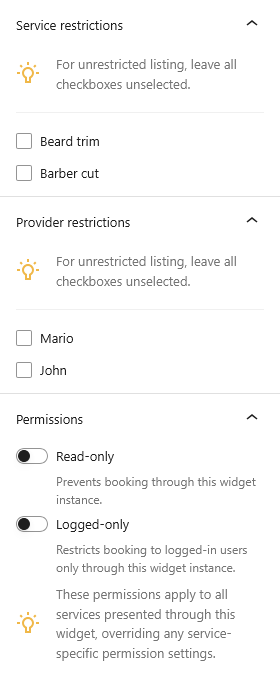
The monthly calendar can show all eligible services, or you can restrict it to specific services and providers.
Use restrictions when a page has a specific purpose, for example:
- one page for consultations only;
- one page for a single provider;
- one landing page for a seasonal service.
To show every bookable service, leave the restrictions empty.
Control access
- Read-only shows availability without allowing customers to book.
- Logged-only requires customers to log in before booking from that widget.
These options affect only the widget instance on that page.
Test before publishing
Open the page as a visitor and complete a test booking. If the calendar is empty, check that the selected services have active availability.