Cancellation
Configure whether customers can cancel their bookings from the website, until when, and whether they must say why.
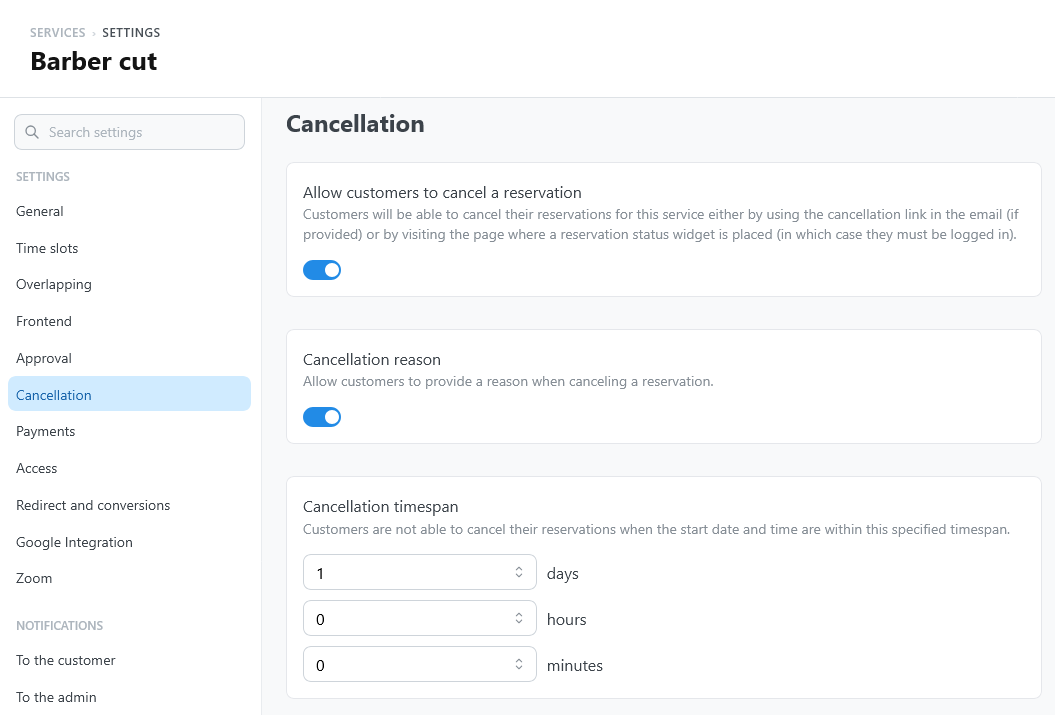
Settings
Open the service settings and select Cancellation.
| Setting | What it does |
|---|---|
| Allow customers to cancel a reservation | Lets customers cancel their bookings of this service from the website. Off by default. |
| Cancellation reason | Whether customers give a reason when they cancel: Not asked (default), Optional, or Required. |
| Cancellation timespan | How close to the start customers can no longer cancel, in days, hours, and minutes. The default is 1 day: for example, with 1 day, a booking at 9:00 AM on Tuesday can be cancelled until 9:00 AM on Monday. |
With Required, customers cannot confirm the cancellation until they write a reason. The reason, up to 500 characters, is visible to the staff only and is stored with the reservation.
What customers see
Customers cancel from My bookings, when they are logged in or open the personal link from a notification email. The booking details say until when the booking can be cancelled, and Cancel booking opens a confirmation with the reason field when the service asks for one.
The confirmation also says that cancelling does not start an automatic refund. TheBooking does not refund payments on its own: refund a paid booking from the reservation in WordPress, where the gateway supports it.
When a booking can no longer be cancelled online, because the service does not allow it or the cancellation timespan has started, the details say so. If you entered contact details for customers under Settings > Core > General, they appear there, so the customer knows how to reach you.
After a cancellation
Cancellation changes the reservation status, releases occupied availability, runs cancellation notifications, updates integrations, and emits the corresponding webhook.
Hard deletion is a separate administrative action and removes reservation-scoped history.