Redirect and conversions
Use a redirect when customers should land on a page of your site after booking this service, for example a thank-you page that records a conversion for your analytics or advertising.
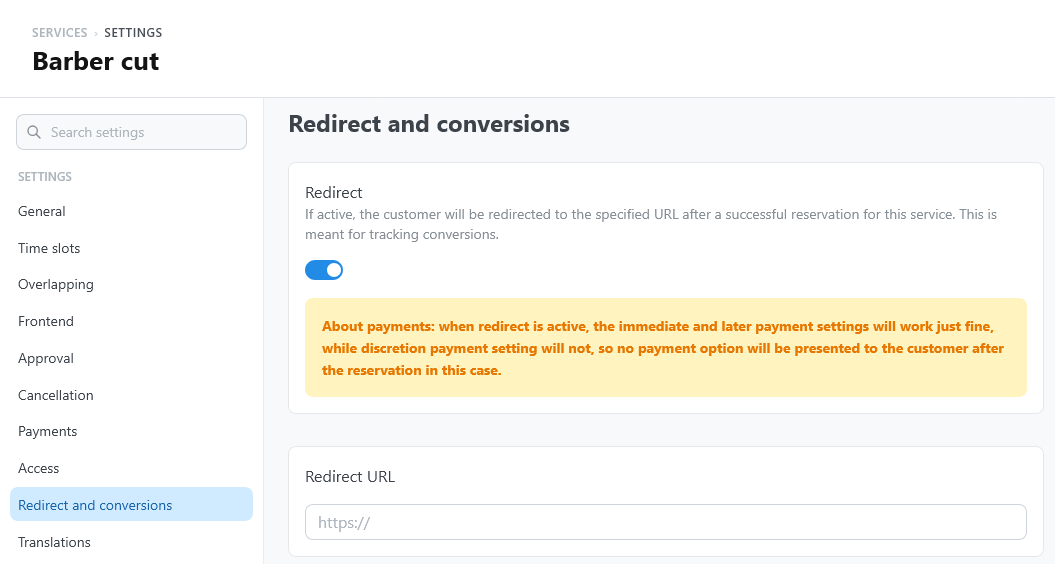
Settings
Open the service settings and select Redirect and conversions.
| Setting | What it does | Default |
|---|---|---|
| Redirect | After a successful booking, the customer leaves the widget and opens the Redirect URL. | Off |
| Redirect URL | The page to open. It must be a full, valid address (for example https://example.com/thank-you/): otherwise the customer stays in the widget. | Empty |
When the customer is redirected
It depends on the payment requirement of the service:
| Payment requirement | What happens |
|---|---|
| No price, or Local | Right after the booking, the customer opens the Redirect URL. The widget does not show its confirmation screen. |
| Online | The customer pays first. After the hosted checkout, the customer returns to the Redirect URL instead of the booking page. |
| Discretionary | The customer opens the Redirect URL right after the booking, so the widget never offers the online payment. |
With Discretionary, a redirect removes the choice to pay online after the booking. Customers can still pay later from My bookings, or at the appointment.
The address after a payment
After the hosted checkout, the customer returns to the Redirect URL with these parameters added: reservation (the reservation number), status, tbk-hash, and tbk-view.
status is only a hint, not the result of the payment. Some gateways set it when the checkout starts: Mollie, for example, always returns with status=success, also when the customer cancels or the payment fails. TheBooking itself never relies on it: the widget reads the payment state from the server.
tbk-hash is the code of the customer's personal link: with it, anyone can open the booking in My bookings. Analytics and advertising tools often record the full address of a page, so configure them to drop the query string, or at least the tbk-hash parameter, on the redirect page.
Track conversions reliably
- Bookings. Count a booking conversion on the redirect page, not when the customer selects Confirm booking: the booking can still fail at that point.
- Paid bookings. Reaching the redirect page after an online payment means only that the customer came back from the checkout. Customers who close the checkout never reach it, and those who reach it might not have paid. To count a paid booking, confirm the payment on the server: the
payment.registeredwebhook is sent when the gateway confirms the payment, with the reservation, the gateway, and the amount. You can also check the payment state of the reservation in Reservations. - Approval. A reservation that waits for approval is a request, not yet an accepted booking.