Google Maps
The Google Maps integration adds location features to the booking widget:
| Feature | Where customers see it | API key needed |
|---|---|---|
| Map of the location | Details step, after the customer presses Show map | No |
| Directions link | Confirmation screen and booking details in My bookings | No |
| Address autocomplete | Address field of the booking form | Yes |
Enable the integration
- Open Settings > Integrations and turn on Google Maps.
- In each service that has a location, review Show map and Location visibility in the general settings.
The map and the Directions link work without an API key.
For privacy, the map does not load with the page. The details step shows the address and a Show map button, with a note that Google Maps receives the address and the visitor's IP address. The map loads only after the customer presses the button.
Address autocomplete
Address autocomplete suggests addresses while the customer types in the address field of the booking form. It suggests addresses only, not businesses or other places. Customers can choose a suggestion with the mouse, by touch, or with the arrow keys and Enter.
Autocomplete needs a Google Maps Platform API key:
- Create an API key in a dedicated Google Cloud project, with billing enabled.
- Enable the Maps JavaScript API and Places API (New) for the project.
- Restrict the key to your website (HTTP referrers): the production and staging site origins.
- Restrict the key to the enabled APIs.
- Open Settings > Google Maps, enter the key in Google Maps API key, and turn on Use Google Places for address autocomplete.
- Test the address field on the frontend.
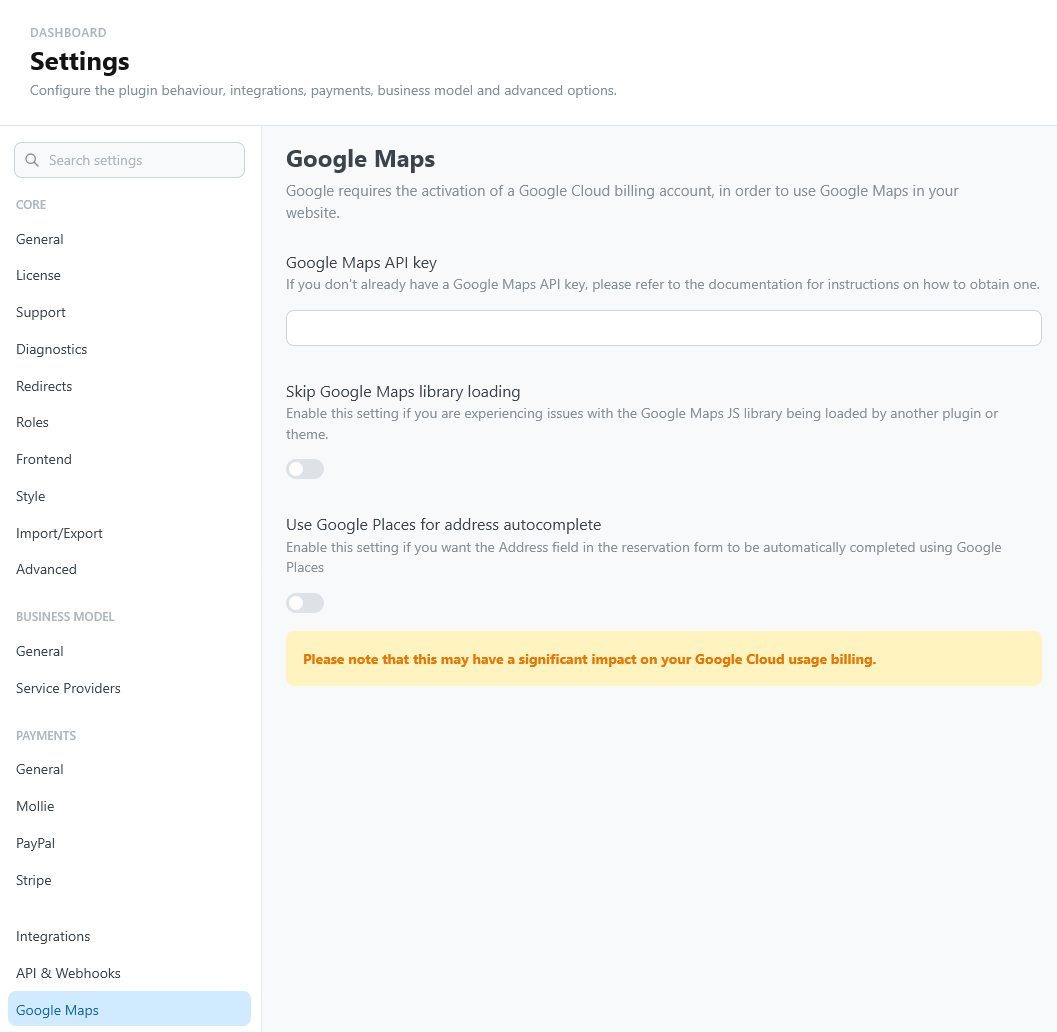
The key is added to the page only when address autocomplete is enabled. Without autocomplete, the page does not load the Maps JavaScript API and does not expose the key.
Since version 4.1, autocomplete uses Places API (New). Keys that enable only the legacy Places API keep working. For a new key, or if autocomplete stops working, enable Places API (New) for the key's project.
The key is sent to every visitor's browser. Without restrictions, anyone can copy it and use it on your billing account. In Google Cloud, restrict it to your website (HTTP referrers) and to the APIs that TheBooking uses.
Google requires a billing account for Maps Platform, even when usage stays within the free allowance, and address autocomplete can raise your Google Cloud bill.
If another plugin or the theme already loads the Google Maps JavaScript library and the two conflict, turn on Skip Google Maps library loading.
Troubleshooting
When address lookup fails, verify the integration flag, the autocomplete setting, the allowed referrers, the enabled APIs (including Places API (New)), the billing status, and the browser console before regenerating the key.