Live updates
Without Live updates, TheBooking reads your Google calendars from Google when availability is loaded, and keeps the result for the Refresh delay of Settings > Integrations > Google Calendar. With Live updates on for a Google account, TheBooking keeps a synced copy of the calendars of that account, and Google notifies the site when they change. Bookable times come from the copy, without a request to Google at every visit, so they load faster and use less of your Google API quota.
Live updates are off for every account until an administrator turns them on. Until then, nothing changes.
Requirements
- A public HTTPS site. Google sends its notifications only to an HTTPS address that it can reach. A site on
localhost, on an IP address, or on a.localor.testaddress cannot receive them. - An administrator. Only administrators see the Live updates switch. A provider sees the state of their calendars, and the page of a calendar says that an administrator sets Live updates for the whole account.
- An enabled account whose calendars TheBooking can read. To turn Live updates on, TheBooking reads the account's list of calendars from Google. If it cannot, the switch goes back off with the reason, for example The calendars of this account could not be verified. Check the Google account and try again.
Turn it on
- Open Availability > Calendars.
- On the card of the Google account, turn on Live updates.
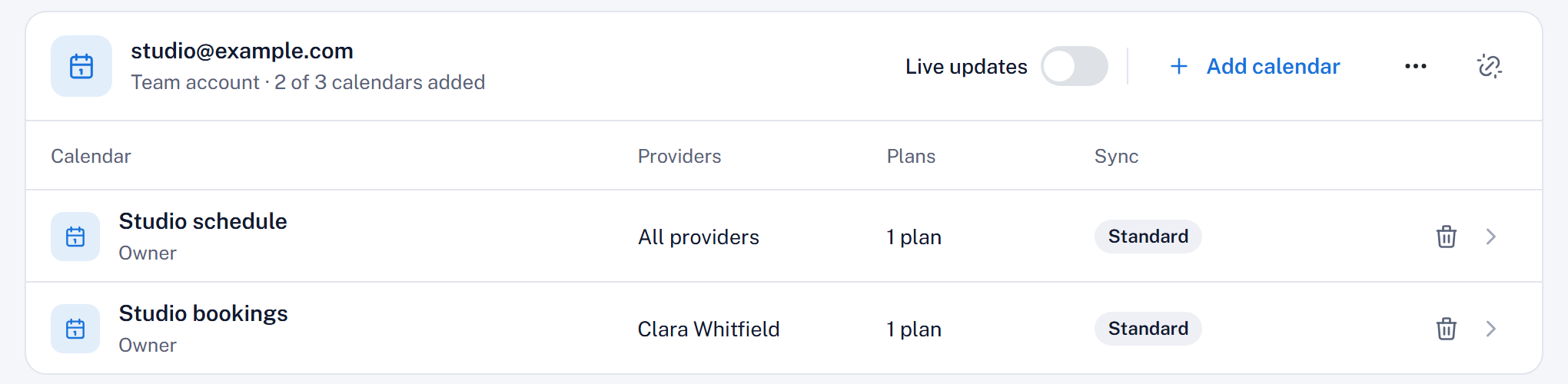
The choice applies to every calendar of the account, also to the calendars you add later.
TheBooking then prepares a synced copy of each Source and Blocking calendar of the account: the account card counts the calendars ready, for example "1 of 2 ready". Until every calendar of the account is ready, availability is read from Google as before. You do not need to change anything in the plans or the services.
If you turn on Live updates on a site that is not public HTTPS, Availability > Calendars shows Live updates need a public HTTPS site, and availability is still read from Google.
Check the sync state
The Sync column of Availability > Calendars shows the state of each calendar:
| State | Meaning |
|---|---|
| Standard | Live updates are off for the account, or no plan uses the calendar. Availability is read from Google, with the Refresh delay. |
| Preparing | TheBooking is creating the synced copy, or is waiting for Google to confirm its notifications. Until then, availability is read from Google. |
| Live | The synced copy is up to date, and Google notifies the site when the calendar changes. |
| Needs attention | The account must be reconnected: Google no longer accepts its access, or a permission is missing. |
| Not available | Google does not share the changes of this calendar with the site. |
| Error | The last check with Google failed. Availability is read from Google until it works again. |
Hover over a state to read its reason. The page of a calendar explains its state under Live updates.
How availability stays correct
- One calendar can hold back the account. TheBooking uses the synced copies of an account only when every Source and Blocking calendar of the account is ready. If one of them cannot use Live updates, the account card says how many, for example "1 can't use Live updates", with the reason, and the whole account is read from Google.
- Changes in progress. When Google reports a change, TheBooking reads availability from Google until the change is applied to the copy.
- Periodic check. In addition to the notifications, TheBooking checks each calendar with Google every 6 hours. TheBooking runs this check, and prepares the copies, in a WordPress scheduled task that runs every minute. When a check is late, availability is read from Google until it runs.
- Period. The copy covers each calendar from yesterday to one year ahead.
In each of these cases, the fallback is the behavior without Live updates: availability read from Google, with the Refresh delay.
Destination calendars
A calendar that only receives the bookings of a plan does not need a synced copy. With Live updates on, it gets Google's notifications when a plan uses it for cancellation from Google Calendar, which needs them to see the deleted events.
Turn it off
Turn off Live updates on the card of the account. TheBooking stops the notifications at once, and reads the calendars of the account from Google again, with the Refresh delay. Turning off does not need Google, so you can do it also when Google is not reachable.
Cancellation from Google Calendar needs Live updates on the account of its Destination calendar. With Live updates off, it pauses, and no booking is cancelled from Google.
Disconnecting an account removes its Live updates choice. When you connect the account again, turn Live updates on again.
Related
- Configure Google Cloud: the Refresh delay
- Cancellation from Google Calendar
- Connect a Google account