Frontend
Settings > Core > Frontend sets how every booking widget of the site behaves. The look of the widget is set in the Customizer instead: see Customize the frontend.
| Setting | What it does | Default |
|---|---|---|
| Pre-populate booking form | Fills the booking form of logged-in customers with data from their WordPress profile. See Pre-filled fields. | Off |
| Booking flow | Service first: customers choose the service, then the date and time. Calendar first: customers choose a day, then a service. A single widget can use the other flow. See Booking workflow. | Service first |
| Load the calendar on the nearest date with available slots | When a customer opens the calendar of a service, it moves to the first day with free times and selects it. See Nearest date. | Off |
| Frontend Timezone | The timezone of the times in the widget. Customer's local timezone shows each visitor the times in their own timezone. See Widget timezone. | Customer's local timezone |
| Services sorting order | The order of the services in the widget. Drag the services into place. | None |
| Providers sorting order | The order of the providers in the widget. It also decides between providers with the same nearest time for Soonest available. It appears only when providers are enabled. | None |
Services and providers that are not in the sorted list, for example ones you add later, appear after the sorted ones.
Pre-filled fields
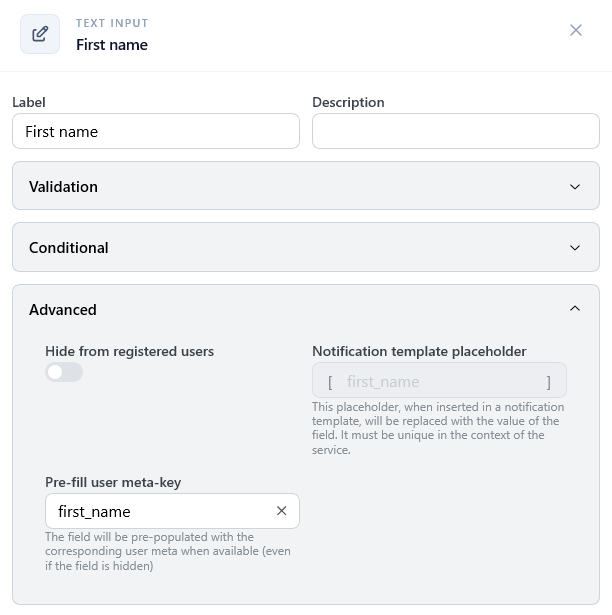
With Pre-populate booking form on, each field of the booking form can start with a value of the logged-in customer's WordPress profile. The customer can still change it.
Each field reads the profile value set in its Pre-fill user meta-key, in the booking form of the service. Choose a value from the list, such as Email, First name, or Last name, or type the meta key of another plugin.
Fields without a meta key, and visitors who are not logged in, see the field's default text.
Nearest date
The widget looks for the first day with free times month by month, up to 12 months ahead. Each month is one more request to the site, so a service whose next free day is far away can open more slowly.